




Tp-link Archer c20 AC750 Dual Band 3 Antenna Router
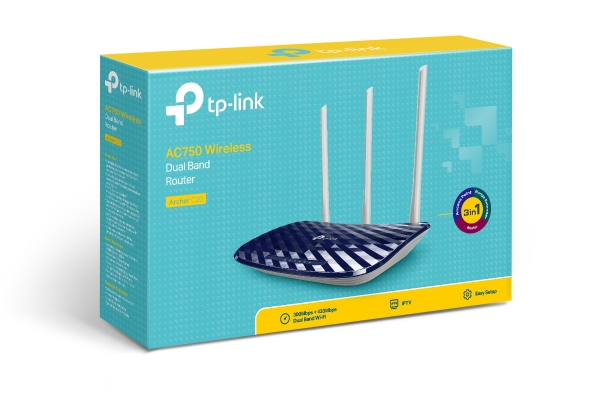
The TP-Link Archer C20 AC750 is a high-performance wireless router that provides reliable and fast internet connection for your home or small office. With its dual-band technology, the Archer C20 AC750 can deliver speeds of up to 750Mbps, allowing you to stream HD videos, play online games, and download large files without any lag. In this article, we will take a detailed look at the features and specifications of the TP-Link Archer C20 AC750 and explain why it is a great choice for anyone in need of a high-performance wireless router.
Design and Build Quality
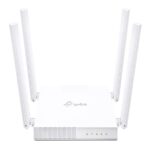
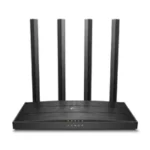
The TP-Link Archer C20 AC750 has a sleek and modern design that will blend seamlessly with any home or office decor. TP-Link routers are made of high-quality materials and has a sturdy build that ensures durability and longevity. The router has three non-detachable antennas that provide a wide coverage area and a stable signal strength.
Dual-Band Technology
The TP-Link Archer C20 AC750 is equipped with dual-band technology that allows it to operate on both the 2.4GHz and 5GHz frequency bands. This means that the router can provide faster and more stable internet connection for all your devices. The 2.4GHz band is ideal for basic internet activities such as browsing the web, sending emails, and streaming music, while the 5GHz band is perfect for more demanding tasks such as streaming HD videos and playing online games.
Advanced Security Features
The TP-Link Archer C20 AC750 comes with advanced security features that help protect your network from potential threats. The router supports WPA/WPA2 encryption, which is considered to be the strongest security protocol currently available. Additionally, the router also has a built-in firewall that can block unwanted access to your network.
Easy Setup and Management
The TP-Link Archer C20 AC750 is easy to set up and manage. The router comes with a user-friendly web interface that allows you to configure and monitor your network with ease. You can also use the TP-Link Tether app to set up and manage your router from your smartphone or tablet.
|
WIRELESS |
|
|---|---|
| Standards and Protocols | Wi-Fi 5 IEEE 802.11ac/n/a 5 GHz IEEE 802.11n/b/g 2.4 GHz |
| WiFi Speeds | AC750 5 GHz: 433 Mbps (802.11ac) 2.4 GHz: 300 Mbps (802.11n) |
| WiFi Range | 2 Bedroom Houses
3× Fixed Antennas |
| WiFi Capacity | Medium
Dual-Band |
| Working Modes | Router Mode Access Point Mode Range Extender Mode |
|
SECURITY |
|
|---|---|
| Network Security | SPI Firewall Access Control IP & MAC Binding Application Layer Gateway |
| Guest Network | 1× 5 GHz Guest Network 1× 2.4 GHz Guest Network |
| WiFi Encryption | WEP WPA WPA2 WPA/WPA2-Enterprise (802.1x) |
|
HARDWARE |
|
|---|---|
| Processor | Single-Core CPU |
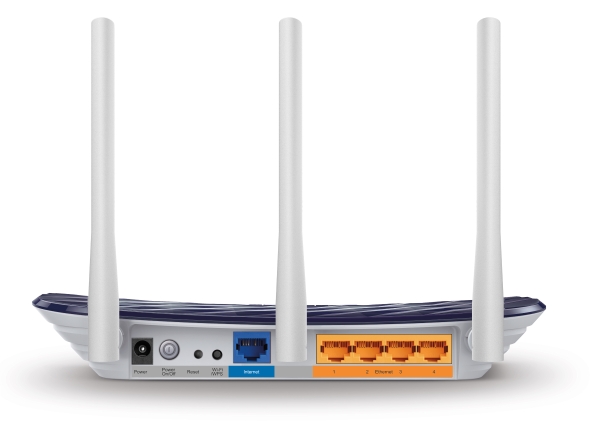
| Ethernet Ports | 1× 10/100 Mbps WAN Port 4× 10/100 Mbps LAN Ports |
| Buttons | WPS/Wi-Fi Button Power On/Off Button Reset Button |
| Power | 9 V ⎓ 0.6 A |
|
SOFTWARE |
|
|---|---|
| Protocols | IPv4 IPv6 |
| EasyMesh | Mesh networking creates smooth, fast, stable roaming. Archer C20 can build an EasyMesh network with devices that use EasyMesh technology. It also works with other TP-Link products to create a OneMesh network. Eliminate Wi-Fi dead zones, expand your network, and fill your entire home with high-speed Wi-Fi. Learn More> |
| Parental Controls | URL Filtering Time Controls |
| WAN Types | Dynamic IP Static IP PPPoE PPTP L2TP |
| Quality of Service | QoS by Device |
| Cloud Service | OTA Firmware Upgrade TP-Link ID DDNS |
| NAT Forwarding | Virtual Server Port Forwarding Port Triggering DMZ UPnP |
| IPTV | IGMP Proxy IGMP Snooping |
| DHCP | Address Reservation DHCP Client List Server |
| DDNS | NO-IP Comex DynDNS |
| Management Features | Tether App Webpage Check Web Emulator> |
|
OTHER |
|
|---|---|
| Network Services Enabled by Default | Web Server Manage and configure device through web (HTTP/HTTPS) • Port: 80/443 Protocol: TCP DNS DHCP Server App management Alexa service |
| System Requirements | Internet Explorer 11+, Firefox 12.0+, Chrome 20.0+, Safari 4.0+, or other JavaScript-enabled browser
Cable or DSL Modem (if needed) Subscription with an internet service provider (for internet access) |
| Certifications | FCC, CE, RoHS |
| Environment | Operating Temperature: 0℃~40℃ (32℉ ~104℉) Storage Temperature: -40℃~70℃ (-40℉ ~158℉) Operating Humidity: 10%~90% non-condensing Storage Humidity: 5%~90% non-condensing |
|
TEST DATA |
|
|---|---|
| WiFi Transmission Power | CE: <20dBm(2.4GHz) <23dBm(5GHz) |
| WiFi Reception Sensitivity | 5GHz: 11a 54M: -76dBm; 11ac VHT20 MCS8: -71dBm; 11ac VHT40 MCS9: -66dBm; 11ac VHT80 MCS9: -62dBm 2.4GHz: 11g 54M: -76dBm11n; HT20 MCS7: -73dBm; 11n HT40 MCS7: -71dBm |
|
PHYSICAL |
|
|---|---|
| Dimensions (W×D×H) | 9.1 × 5.7 × 1.4 in (230 × 144 × 35 mm) |
| Package Content | Wi-Fi Router Archer C20 Power Adapter RJ45 Ethernet Cable Quick Installation Guide |

















Reviews
Clear filtersThere are no reviews yet.